EcoGuide · Smart Thermostats · Published 2026-11-21 · 1,700 words
Nest Thermostat Error Codes: What E74, E73, N260, W5 and Others Mean, and How to Fix Them
Check today’s prices
Prices on Amazon change often. As an Amazon Associate we earn from qualifying purchases, at no extra cost to you.
The Short Answer
A Nest help code is a letter and a number, shown on the thermostat with a link such as nest.com/e74. Most are E or N codes about wiring and power; W and TD codes are Wi-Fi and app connection problems; T codes come from the system test after installation. Look up yours below. The meanings are Google’s own wording from its help code list.
| Code | What Google says it means | Fix |
|---|---|---|
| E4, E24, E74 | No power to Rh wire detected. | Power codes; full guide: Nest E74 |
| E3, E23, E73 | No power to Rc wire detected. | Power codes |
| E2, E22, E72, E402 | No power wires detected. Rc or Rh wire required. | Power codes |
| E9, E29, E79, E159 | No power to C wire detected. | Power codes |
| E298, E448 (and M20) | No system power. | Power codes |
| E1 | Common wire (“C” wire) is required. | C wire codes |
| N260, N410 | A C wire or Nest Power Connector is recommended for your thermostat. | C wire codes |
| N261, N411 | Low power to C wire. | C wire codes |
| E5, E25, E75, E155, E255, E405 | No heating or cooling detected. W1 or Y1 wire is required. | Wiring codes |
| E6 | Too many wires detected. Please remove at least one of O/B, W1, Y1 or AUX. | Wiring codes |
| E7, E27, E77, E407 | Y1 wire not detected. A heat pump requires a Y1 wire. | Wiring codes |
| E11 | Heat pump wire O/B detected. No heat pump system present. | Wiring codes |
| E10, E30, E66, E80, E116, E160, E196, M13; E296, N262, N263, N412, N413 | The air conditioner stopped sending power to the thermostat (often maintenance or a cold-weather safety switch). | Cold-weather codes |
| W1 | The Nest thermostat can’t continue to connect to your Wi-Fi network. | Wi-Fi codes |
| W5 | Failed to connect. | Wi-Fi codes |
| M15 | Your thermostat couldn’t be added to your account. | Setup code |
Before you open the thermostat: turn the system off at the breaker or fuse box, and take a photo of the wiring before you touch anything. If the code is not listed here, Google’s full list covers every code.
Power Codes: E74, E73, E2, E9, E298, E448, M20
These mean the thermostat is not getting power on a wire it expects. Google’s “No power” article (written for the Nest Thermostat and Nest Learning Thermostat 4th gen; the steps are the same idea on older models) gives this order:
- Rule out the battery. Replace the batteries in a Nest Thermostat; charge a Learning Thermostat by USB if it has turned off. Check that the HVAC breaker is on.
- Check the wiring. With power off at the breaker, remove the display and look for wires that appear grey in the app’s wiring screen, which Google says means the wire “isn’t electrically detected.” Strip about ⅓ to ½ inch of clean copper and seat the wire fully in the right connector.
- Turn the power back on and check the code again.
- Add steady power. Google says the thermostat “may require a C wire or the Nest Power Connector to provide enough consistent power.”
- Still there? Google says to contact its support or a local pro.
E74 and E73 have a full walkthrough here: Nest E74: no power to Rh wire.
C Wire Codes: E1, N260, N261
E1 means the thermostat needs a common (C) wire. N260 and N410 are a recommendation rather than a fault: Google says a C wire or Nest Power Connector is recommended for your thermostat. N261 and N411 mean the C wire is there but delivering too little power.
- If there is an unused wire tucked behind the wall plate and a free C terminal at the furnace, a pro (or a confident DIYer) can connect it at both ends.
- If there is no spare wire, the Nest Power Connector installs at the furnace and supplies the power instead. Google notes that when you install one with an N260 code, the equipment cover must be closed.
- N261: check that the C wire is fully seated at both ends before buying anything.
We may earn a commission if you buy through these links, at no extra cost to you. Products are chosen on published specifications; we do not test them in-house (how we choose).
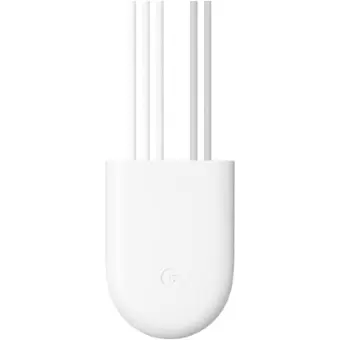
Google Nest Power Connector
Installs at the HVAC system to give the thermostat steady power when there is no C wire. Check that it is compatible with your system before buying.
Check price on AmazonWiring Codes: E5, E6, E7, E11
These mean the wires the thermostat detects don’t match a system it understands: no heating or cooling wire (E5), too many wires (E6), a heat pump without a Y1 wire (E7), or an O/B wire with no heat pump (E11). Common causes are a wire left in the wrong terminal after installation, or a wire that is not pushed in far enough.
If you changed the wiring, update it in the app so the thermostat knows: in the Google Home app open the thermostat, then Settings → Thermostat → Wiring → Update Wiring, and follow the steps on screen. Then test heating and cooling.
Cold-Weather Codes: E10, E30, E80, E160, E196, M13, N262
Google says you see these when your air conditioner stops sending power to your thermostat, usually because of system maintenance or a low-pressure or safety switch that trips in cold weather.
For E10, E30, E66, E80, E116, E160, E196 and M13, Google’s quick fix to get heat back:
- Turn the power off at the breaker or fuse box.
- Remove the display, photograph the wires, then disconnect any Y wires (Y, Y1, Y2). If you have both Rc and Rh, disconnect those too. Wrap the bare ends in electrical tape.
- Reattach the display and turn the power back on. If it won’t turn on, charge it by USB or replace its batteries.
- Google warns: “You won’t be able to use your AC until you reconnect your Y1 wire.” The lasting fix is a C wire or a Nest Power Connector.
For E296, N262, N263, N412 and N413, Google says to check the battery level and replace the batteries if needed, then install a C wire or a power accessory such as the Nest Power Connector.
Wi-Fi Codes: W1, W5 and TD Codes
- W1: Google says your router may not fully support a Wi-Fi standard known as power saving mode, and it links a list of routers that are incompatible with Nest products. Check your router against it.
- W5: Google says the thermostat “can’t connect to Wi-Fi” and that this “could indicate a hardware malfunction.” Restart it from Settings → Reset → Restart, then reconnect under Settings → Network. If W5 comes back, Google says the thermostat will need to be replaced; contact Google support with the code and serial number.
- TD codes are app and Wi-Fi connection errors; Google lists them here. Our step-by-step: Nest thermostat offline.
Setup Code: M15
M15 means setup did not finish adding the thermostat to your account. Google’s fix: on the thermostat select Learn More, then Reset Device; it restarts and setup resumes in the app. Google says this resets only the account settings, not all of your thermostat settings. If the app shows the thermostat as incomplete, tap Finish Setup; removing and re-adding it in the app is the last resort.
T Codes After Installation
T codes come from the System Test you run after installing. Google lists T01 (single stage fan) to T12 (three stage fan), and its steps are the same for all of them: let the test run longer (it stops on its own after 35 minutes), check the breaker or fuse, check each wire is fully inserted in the right connector with the power off, and test again before calling a pro. Google adds that baseboard electric heat is usually 120 V and not compatible with Nest thermostats.
When to Call a Pro
- The code points to the HVAC system itself: no system power with the breaker on, or a cold-weather code that keeps returning.
- You would need to run a new C wire or install the Nest Power Connector at the furnace and you are not comfortable working inside it.
- Your heating is baseboard electric, which Google says is usually 120 V and not compatible with Nest thermostats. See thermostats for baseboard heaters.
Free: Home Energy Audit Checklist (PDF)
A two-page, room-by-room checklist for finding air leaks, standby power and heating and cooling waste yourself, in the order that pays back fastest. Free to download, no sign-up needed.
Download the checklist (PDF)Frequently Asked Questions
What does E74 mean on a Nest thermostat?
Google says E74 (and E4, E24) means “No power to Rh wire detected.” Turn the power off, check the Rh wire is fully seated with clean copper showing, then check the furnace breaker and fuse. Full steps: our Nest E74 guide.
What does E73 mean on a Nest thermostat?
E73 (and E3, E23) means “No power to Rc wire detected.” It is the cooling-side power wire; the checks are the same as for E74.
What does N260 mean on a Nest thermostat?
Google says N260 means a C wire or Nest Power Connector is recommended for your thermostat. It is a warning that power is marginal, not a fault in itself.
What does W5 mean on a Nest thermostat?
Google says W5 means the thermostat can’t connect to Wi-Fi and could indicate a hardware malfunction. Restart it and reconnect; if W5 comes back, Google says it needs replacing.
Why does my Nest show an error code only in cold weather?
Codes like E10, E80, E160, M13 and N262 appear when the air conditioner stops sending power to the thermostat, which Google says can happen because of low-pressure or safety switches in cold weather. A C wire or Nest Power Connector is the lasting fix.
Related Guides
- ecobee alerts explained — the ecobee equivalent
- Nest E74: no power to Rh wire — the full walkthrough
- Nest thermostat offline — W and TD codes, step by step
- Nest thermostat low battery — the power problem behind many codes
- Best smart thermostat without a C wire — if you are replacing it
- Honeywell thermostat error codes — the Honeywell equivalent
- Smart thermostat troubleshooting — every fix guide by symptom
Sources
- Google Nest Help: Troubleshoot Nest thermostat help codes
- Google Nest Help: Troubleshoot a “No power” alert (E298, E448, M20)
- Google Nest Help: E10, E30, E66, E80, E116, E160, E196, E296, M13, N262, N263, N412, N413
- Google Nest Help: Troubleshoot a W5 code
- Google Nest Help: Troubleshoot an M15 error
- Google Nest Help: TD error codes