EcoGuide · Smart Thermostats · Published 2026-10-01 · 1,200 words
ecobee Sensor Not Working? Fixes for N/A, Pairing and Wrong Readings
The Short Answer
Most ecobee sensor problems come down to the battery, the distance to the thermostat, or a setting that tells the thermostat to ignore the sensor. First check which sensor you have, because ecobee sells two and they use different batteries:
| SmartSensor (current) | Room Sensor (older) | |
|---|---|---|
| Battery | 3 V CR2477, up to 5 years (not CR2477N) | CR2032 coin cell, about 1 year |
| Pairing | QR code in the ecobee app | Pull tab, then confirm on the thermostat |
| Distance to thermostat | At least 24 inches away while pairing | Up to 45 feet |
| Works with Essential and Lite | Yes | No |
Figures are from ecobee’s SmartSensor guide and Room Sensor guide. Then find your symptom:
| Symptom | Most likely cause | Jump to |
|---|---|---|
| Sensor shows N/A or drops out | Low battery, too far away, radio interference | N/A and disconnects |
| Will not pair | Pairing steps out of order, an active hold, the battery | Pairing |
| Room is ignored or temperature looks wrong | Sensor not participating, placement, Follow Me | Wrong readings |
| Says nobody is home when you are | Occupancy sensor cannot see you | Occupancy |
Sensor Shows N/A or Keeps Disconnecting
A sensor that has lost contact shows as a hollow icon with no signal waves and “N/A” underneath. ecobee lists three causes for Room Sensors: the battery is low, it is more than 45 feet from the thermostat, or something interferes, such as thick walls or other devices on the same 915 MHz band like baby monitors and cordless phones.
- Replace the battery. ecobee says a low battery causes frequent disconnects and can stop the sensor re-pairing. Use the right cell: CR2477 for a SmartSensor (ecobee says the CR2477N does not fit), CR2032 for a Room Sensor.
- Unpair and re-pair it. On the thermostat, Main Menu → General → Sensors, tap the sensor, then the trash icon and Unpair. Pair it again using the steps in the next section.
- Run ecobee’s 24-hour test. Leave the sensor next to the thermostat for a day. If it stays connected there, ecobee says the original spot was too far away or another device is interfering. Move it closer, or move the interfering device.
Sensor Will Not Pair
ecobee’s SmartSensor reset steps, in order:
- If a hold is active on the thermostat, cancel it.
- Take the battery out, put it back in + side down and close the lid.
- Power-cycle the thermostat: pull it off the wall, leave it off for about two minutes, then put it back.
- When it has rebooted, start pairing again in the app. Once the QR code is scanned, put the battery in + side up and close the lid.
- Keep the sensor at least 24 inches from the thermostat while pairing, and do not mount it until pairing has finished.
Lost the QR code? ecobee says there is a backup QR code and sensor ID on a sticker inside the battery compartment. For an older Room Sensor, the steps are similar: remove the battery, power-cycle the thermostat for two minutes, then reinsert the battery with the sensor held close to the thermostat and wait for the pairing prompt.
Room Ignored or Temperature Looks Wrong
The thermostat does not show one room’s temperature; it shows the average of the sensors that are participating in the current Comfort Setting (Home, Away, Sleep). Three settings change that average:
- Sensor participation. Each sensor can be switched in or out per Comfort Setting under Main Menu → General → Comfort Settings → [setting] → Sensor Participation. ecobee notes a sensor joining or leaving is phased in over 30 minutes, and that during a manual hold the thermostat uses the Home participation rules.
- Follow Me. With Follow Me on, the thermostat gives more weight to sensors in rooms with recent activity, so the displayed temperature moves as people move. Turn it off under Main Menu → General → Sensors → Follow Me if you want a steady average.
- Thermal Protect. This threshold ignores a sensor whose reading differs too much from the others. A sensor in a sunny window or next to a vent can be dropped for that reason.
Placement matters as much as settings. ecobee recommends about four feet high on a shelf or five feet on an interior wall, away from direct sun, exterior walls and windows, vents, fans and drafts, and electronics such as TVs, lamps and the thermostat itself. If one sensor is always a steady amount off, ecobee’s Temperature Correction threshold can offset it; if the difference varies, fix the placement instead.
Occupancy: It Thinks Nobody Is Home
ecobee’s sensors detect people with infrared body heat and judge occupancy by continued presence, not just motion. The Room Sensor sees about 120° across and 25–30° vertically, so a sensor facing a wall or tucked behind furniture misses people. Mount it facing the room where you actually sit. Wrong occupancy is the usual reason Smart Home & Away changes the temperature unexpectedly; see ecobee changing temperature by itself.
If You Need More Sensors
We may earn a commission if you buy through these links, at no extra cost to you. Products are chosen on published specifications; we do not test them in-house (how we choose).
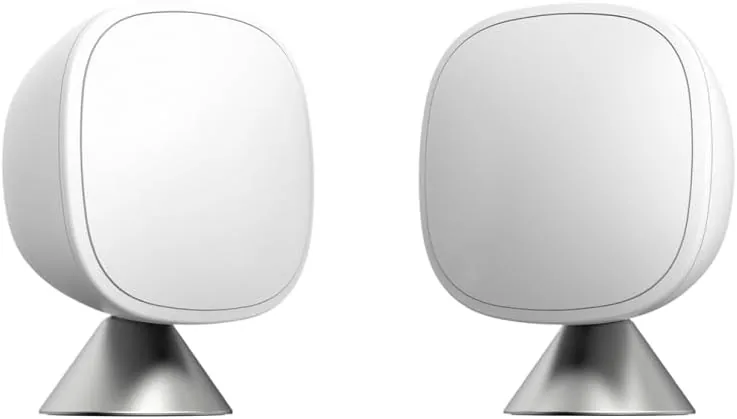
ecobee SmartSensor 2-Pack
Temperature and occupancy sensors for ecobee thermostats, including the Essential and Lite; CR2477 battery rated for up to 5 years.
View on AmazonFree: Home Energy Audit Checklist (PDF)
A two-page, room-by-room checklist for finding air leaks, standby power and heating and cooling waste yourself, in the order that pays back fastest. Get it now, plus new fix guides by email. Unsubscribe any time.
By signing up you agree to receive emails from EcoHome Intelligence. See our Privacy Policy.
Frequently Asked Questions
Why does my ecobee sensor say N/A?
It has lost contact with the thermostat. ecobee lists a low battery, more than 45 feet of distance, or interference from other 915 MHz devices. Replace the battery, then unpair and re-pair it.
What battery does an ecobee SmartSensor use?
A 3 V CR2477 battery, rated for up to 5 years. ecobee says CR2477N batteries are not compatible. The older Room Sensor uses a CR2032.
Why is my ecobee showing a different temperature than the room I’m in?
The thermostat shows the average of all sensors participating in the current Comfort Setting, weighted toward occupied rooms if Follow Me is on. Change which sensors participate, or turn off Follow Me.
How far can an ecobee sensor be from the thermostat?
ecobee gives up to 45 feet for Room Sensors, less through thick walls, between floors or near other 915 MHz devices. When pairing a SmartSensor, keep it at least 24 inches from the thermostat.
Related Guides
- ecobee changing temperature by itself — Smart Home & Away, Follow Me and more
- Thermostat reading the wrong temperature — placement vs calibration
- ecobee offline — when the thermostat itself drops out
- Smart thermostat troubleshooting — every fix guide by symptom
